Introduction
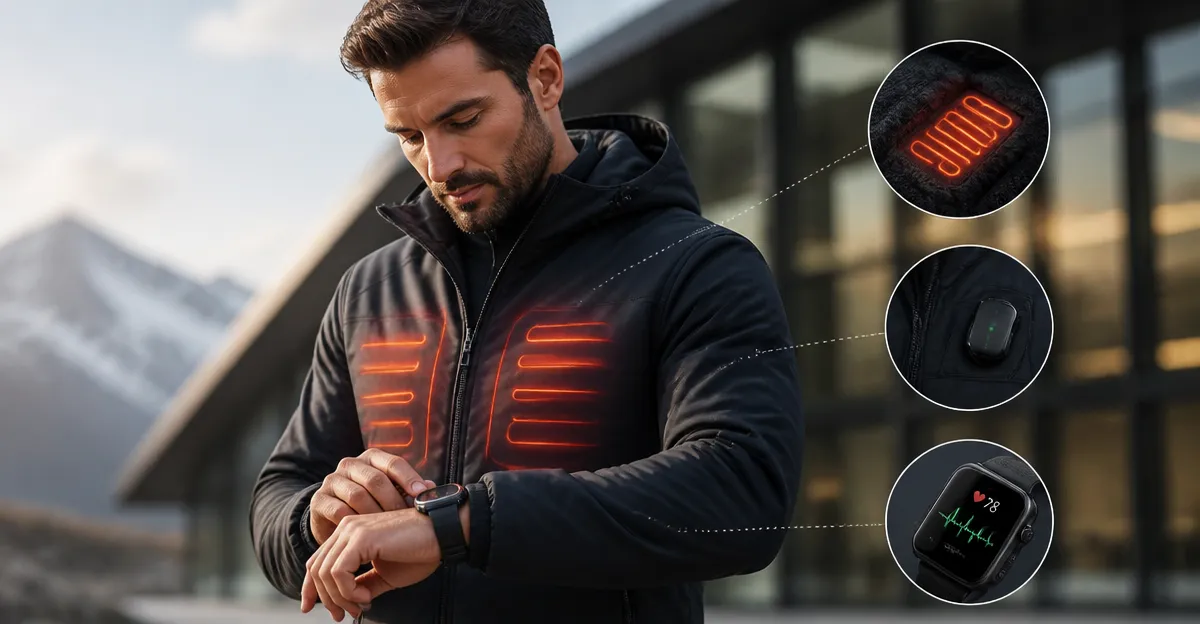
This guide explains how to integrate heated clothing with heart rate, temperature and fitness trackers. One will discover why combining thermal regulation with biometric monitoring enhances performance during outdoor activities, cold‑weather training and remote health monitoring. The reader will learn to select appropriate apparel, install companion applications, pair devices, configure sensor zones and optimise data flow. By following the step‑by‑step instructions, one can achieve reliable temperature control while capturing accurate health metrics.
What You'll Need
- Smart heated jacket (e.g., Venustas Heated Jacket or ORORO Heated Fleece Jacket)
- Compatible health monitor (heart rate strap, smartwatch or fitness tracker with Bluetooth Low Energy)
- Smartphone or tablet running iOS 13+ or Android 9+
- Companion app provided by the jacket manufacturer
- Charging cable and spare battery pack for extended sessions
Step 1: Prepare the Heated Apparel and Health Devices
Begin by inspecting the heated jacket for any visible damage to the heating elements or battery compartment. Ensure the battery pack is fully charged; the Venustas model offers up to eight hours of heat on a single charge, while the ORORO jacket provides comparable endurance with its rechargeable battery. Place the jacket on a flat surface and locate the control panel. Activate the heating function at the lowest setting to verify that all six (Venustas) or four (ORORO) heat zones respond correctly. At this stage, one should also charge the health monitor and enable Bluetooth connectivity. This preparation reduces the likelihood of pairing failures later in the process.
Step 2: Install the Companion Application and Pair Devices
Download the official app from the App Store or Google Play. The Venustas app is named "Venustas SmartHeat" and the ORORO app is "ORORO Heated Wear". Open the app and create a user profile, which will store temperature preferences and health data sync settings. Within the app, navigate to the "Device Pairing" section and select "Add New Jacket". Ensure the jacket is in pairing mode by pressing and holding the power button for three seconds; the indicator LED will flash blue. On the smartphone, enable location services, as Bluetooth scanning often requires it. When the jacket appears in the device list, tap to connect. The app will confirm a successful link and display battery level, heating zones and firmware version.
Step 3: Configure Sensors and Heating Zones
With the jacket paired, access the "Zone Settings" menu. The Venustas Heated Jacket provides six independent zones: chest, back, left sleeve, right sleeve, hood and lower back. Assign each zone a temperature level based on personal comfort and activity intensity. For example, during a high‑intensity ski run, set the chest and back to medium heat while keeping sleeves low to avoid overheating. The ORORO Heated Fleece Jacket offers four zones and includes a heated collar; the collar can be set to low heat to maintain neck warmth without restricting breathing. Record the chosen configuration within the app; this data will be transmitted to the health monitor for contextual analysis.
Step 4: Sync Data with the Health Monitor
Open the health monitor’s companion app (e.g., Apple Health, Google Fit, or a dedicated smartwatch app). Locate the "Data Sources" or "Connected Devices" section and add the heated jacket as a new source. The jacket will transmit temperature readings and zone activation status via Bluetooth Low Energy. Enable the option to share heart rate data from the monitor to the jacket app; this creates a feedback loop where the jacket can adjust heat based on elevated heart rate, preventing excessive sweating. Verify that the health monitor displays real‑time temperature data alongside heart rate, skin temperature and activity metrics. Conduct a short test walk to confirm that the data streams without interruption.
Step 5: Optimize Settings for Performance and Battery Life
After confirming successful synchronization, fine‑tune the system for prolonged use. Set the app to automatically reduce heat when the heart rate exceeds a predefined threshold, such as 150 beats per minute, to avoid dehydration. Schedule battery‑saving modes during periods of inactivity; the Venustas jacket includes a "Sleep" mode that powers down all zones after ten minutes of no movement. For the ORORO jacket, enable the "Eco" setting, which limits maximum temperature to conserve battery. Regularly update the jacket firmware through the app to benefit from stability improvements and new integration features.
Tips & Pro Tips
- Position the battery pack in the inner pocket to maintain balance and prevent cold spots.
- Use a moisture‑wicking base layer to enhance comfort and reduce sweat accumulation.
- Calibrate the health monitor’s skin temperature sensor before each session for accurate baseline readings.
- Keep the jacket and monitor firmware up to date; manufacturers often release patches that improve Bluetooth stability.
- When operating in extreme cold, pre‑heat the jacket for five minutes before outdoor exposure to minimise initial chill.
Troubleshooting
Issue: Jacket does not appear in the app’s device list.
Solution: Restart both the smartphone Bluetooth module and the jacket battery pack. Ensure the jacket is within one meter of the phone and that no other Bluetooth devices are interfering.
Issue: Health data is not syncing.
Solution: Verify that the health monitor’s permission settings allow data sharing with third‑party apps. Re‑authorize the connection in the health app and confirm that the correct data fields (heart rate, skin temperature) are enabled.
Conclusion
By following this guide, one can seamlessly integrate heated clothing with heart rate, temperature and fitness trackers. The process involves preparing the apparel, installing the companion app, configuring heating zones, syncing biometric data and optimizing settings for comfort and battery efficiency. With the Venustas Heated Jacket or ORORO Heated Fleece Jacket, users gain reliable warmth while capturing valuable health metrics, thereby enhancing safety and performance in cold environments.
Products Mentioned in This Guide
Frequently Asked Questions
What types of heated clothing are compatible with health monitors?
Any smart heated jacket that includes Bluetooth Low Energy, such as the Venustas Heated Jacket or ORORO Heated Fleece Jacket, can be paired with standard heart‑rate straps, smartwatches, or fitness trackers.
How do I pair a smart heated jacket with a heart‑rate monitor?
Open the jacket’s companion app, enable Bluetooth on both devices, and follow the in‑app prompts to select and sync the heart‑rate monitor as a sensor zone.
Do I need a specific smartphone OS version to use the companion app?
Yes, the app requires iOS 13 or later, or Android 9 or later, to ensure proper Bluetooth and sensor integration.
Can I control temperature zones while the jacket is transmitting biometric data?
Yes, the companion app lets you adjust individual heating zones in real time without interrupting health‑metric streaming.
What should I do to ensure accurate temperature and heart‑rate readings during outdoor workouts?
Secure the sensors snugly, keep the jacket’s battery charged, and calibrate the app’s sensor zones before starting the activity.